Every room in the building.One AV management platform.
A display in the boardroom, a camera bar in every meeting room, signage in the lobby, a lecture theatre four floors up. One Ody in the comms room controls and manages all of it, and AVDesk brings every room, every asset and every fault back to one support desk.
One small box in the comms room runs the AV in every room of the building. Ody keeps watch, carries your commands and keeps every asset on the register, and it talks to AV equipment only.
Walk the site
Walk through and count the AV
Every space has equipment in it, and every piece of it belongs to somebody's asset register, somebody's maintenance schedule and somebody's phone at eight in the morning. One Ody in the comms room looks after all of it.
The boardroom the executive team uses at nine. A wall display, ceiling microphones, a DSP handling the echo cancellation and a camera on the far wall: the room with the least tolerance for a fault and the fewest people who will raise a ticket about one.
Wall display
Ceiling mic array
DSP / audio processor
Video conference camera
Wireless conferencing
Room touch panel
Ody reaches the boardroom over the site network. It watches the display, the DSP presets and the camera, and it carries a power-on, a mute or a reboot from the support desk without anyone walking up a flight of stairs.
Level 4
Workspace & huddle
Desks, huddle points and a paging zone. None of it is glamorous and all of it is on the register, because when the DSP that runs the paging zone dies, somebody has to know which unit it was, when it was bought and what it is worth.
Huddle displays
Wireless presentation
Ceiling audio
Audio DSP
PTZ camera
Occupancy sensors
The same Ody covers this floor. Every AV unit it talks to lands in the asset register with its model, serial, room and warranty. No spreadsheet, no annual walk-around with a clipboard.
Level 3
Meeting rooms
Rooms that have to work at eight, back to back, all day. Same fit-out, same camera bar, same touch panel in each, which means the same fault repeated four times if you find out about it four separate times.
65-inch displays
Camera bars
Touch panels
Ceiling speakers
Room booking panels
Wireless mics
Ody runs a wake-up check before the first booking. If a display does not come back, the ticket is open before the first person walks in and sets their laptop down, and the support desk can power it on from where they sit.
Level 2
Collaboration space
The open room with the big screen, the auto-framing camera and the ceiling mics, used for town halls, workshops and the sessions half the company joins remotely. The room that gets noticed the moment it fails.
Large-format display
Auto-framing camera
Ceiling microphones
Room speakers
Streaming encoder
Room control
Ody holds the encoder and the mic receivers under the same watch as everything else, so the all-hands is checked the day before rather than three minutes before it starts.
Ground floor
Reception & lobby
Digital signage, a wayfinding kiosk and background music zones. Public-facing equipment that runs fourteen hours a day, is seen by every visitor who walks through the door, and is the first thing anyone notices when a screen freezes.
Signage displays
Media players
Wayfinding kiosk
Background music
Door intercom
Room panels
Ody reports the signage players as devices like any other, so a frozen screen in the lobby raises an alert instead of waiting for someone at the desk to mention it.
Lower ground
AV operations & the comms room
Ody sits in the comms room next to the network switch, and the support team works from the desk outside it. Every level, every room and every open ticket is on one screen, with each device's asset record a click away.
Ody dials out to AVDesk over an encrypted connection. No inbound firewall ports, nothing installed on the equipment, and it talks to AV equipment only.
Lecture theatreProjectors, radio mics, lecture captureAll online
Lecture theatre
The 8am lecture starts on time
Two projectors, a lectern, radio mics and a lecture-capture camera, used back to back from eight until late. Nobody in a full theatre waits patiently for a projector that is still warming up.
Projectors
Projection screens
Lectern
Radio mics
Lecture capture camera
Ceiling mics
Ody powers the projectors on before the first lecture and keeps track of their hours, so a projector near the end of its life becomes a work order rather than a surprise.
Teaching block
Room after room with the same kit
Classroom after classroom with the same display, the same lectern and the same wireless presenter. One fault repeated in every room makes for a very long morning if you find out about it one room at a time.
Displays
Lecterns
Wireless presenters
Document cameras
Ceiling speakers
Room panels
Ody runs a wake-up check across the teaching spaces before the first class. When one display doesn't come back, the ticket is already open with the room and the asset attached.
Library
Quiet rooms, busy screens
Signage at the entry, bookable study rooms with a screen each, and a booking panel outside every door. The library team are not AV technicians, and they shouldn't need to be.
Signage displays
Study room displays
Booking panels
Media players
Ody reports each signage player and study-room screen like any other device. QR labels in each room let anyone report a fault in one tap, and it lands in the same queue as everything Ody raises.
Student hub
The space everyone sees
A display wall, background music and the event AV for everything from orientation week to results day, running from the moment the doors open until the lights go off.
Display wall
Background music
Event mics
Signage
Ody keeps the display wall, the audio and the event kit under the same watch, and carries a power-on or a reboot from the service desk without anyone crossing campus.
Council chamber
Where the council meets
The university's formal boardroom: a long table, a wall display, a camera and ceiling mics for members joining from other campuses. The council meets there a handful of evenings a year, and every one of them matters.
Wall display
VC camera
Ceiling mics
DSP
Touch panel
A scheduled readiness check runs before every meeting, and the service desk can recall a DSP preset or reboot the camera through Ody without walking over.
IT & service desk
Where the whole campus lands
Ody sits in the comms room on the campus network. The service desk sees every building, every room and every open ticket on one screen, with each device's asset record, warranty and service history a click away.
Ody connects out to AVDesk over an encrypted, outbound-only link. It talks to AV equipment only and never touches anything that isn't AV.
One screen
Every riser in the building lands here
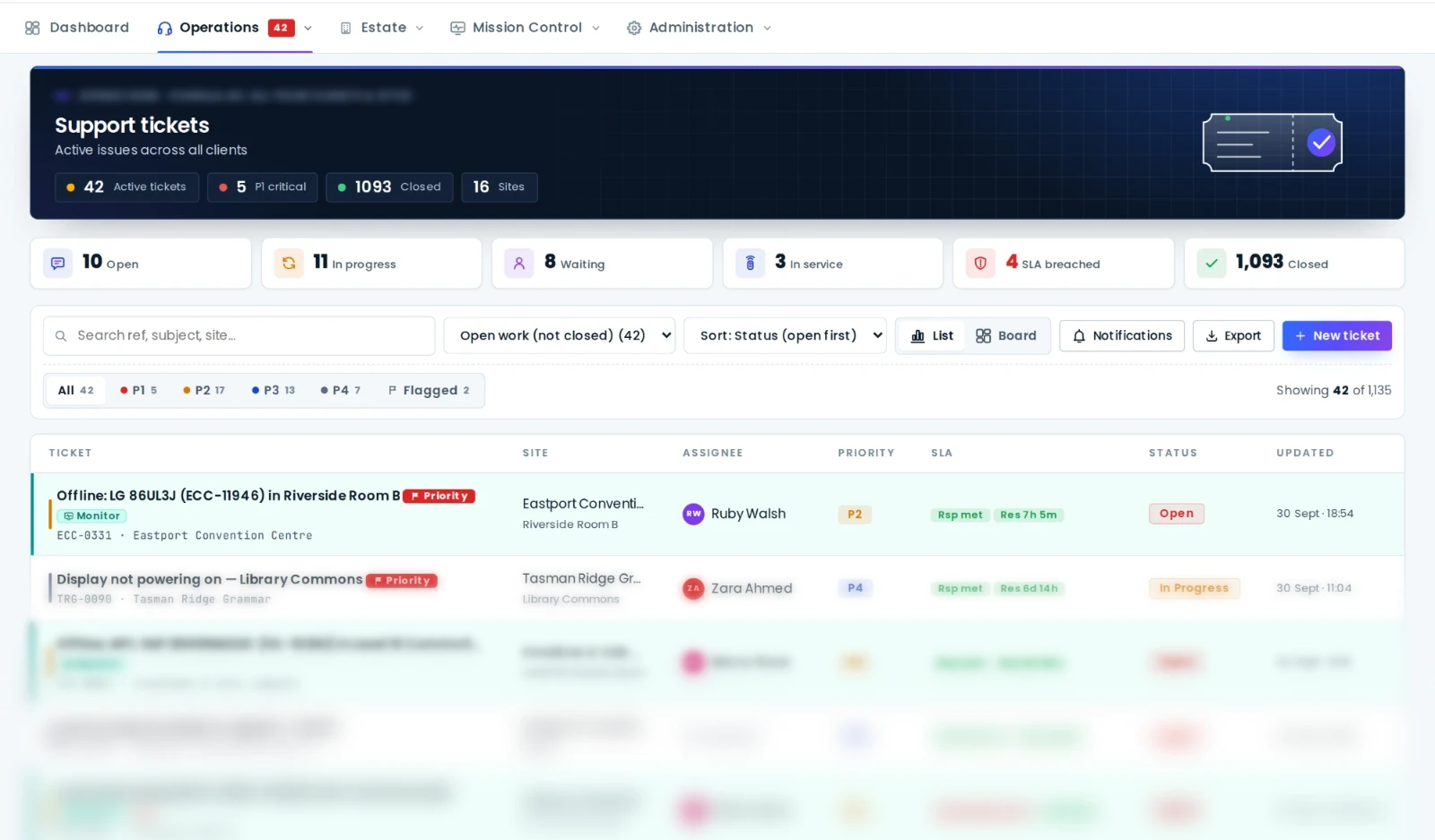
Each site's Ody dials out to AVDesk over an encrypted connection, with no inbound ports and nothing installed on the equipment. What arrives is one estate on one wall: the rooms, their devices, the alerts, the tickets and the SLA clocks. Not just this building. Every site you run.
In AVDesk the asset record is the spine of the whole system. Every monitored device, every ticket, every room, every maintenance job and every dollar of value links back to a register entry, so the register is never a stale spreadsheet. The platform keeps it honest for you.
The register in AVDesk: every asset, its value and its condition, grouped by client, site and room.
Asset recordTag, serial, value, warranty and location
Live monitoringDevice health and alerts
Support ticketsEvery job, every room
Rooms & QR labelsScan straight to the record
MaintenanceSchedule and history
DepreciationValue and budget
DiscoveryFound, then validated
Everything in AVDesk hangs off one record. Change the room, retire the device, close the ticket: the register stays true.
Full financial picture
Purchase cost, straight-line depreciation and current written-down value on every record, rolled up to the value of the whole estate. Finance gets a real number, not a guess.
Warranty & EOL radar
Active, expiring and lapsed warranty at a glance, with forward views of what reaches end-of-life each quarter, so renewals and replacements are planned, never discovered.
Lifecycle & budget forecast
Capital acquisition history and the replacement pipeline in one view. Next year's AV budget largely writes itself from the register.
Auto-discovery & validation
Ody and the SSO connectors keep finding new devices on their own. Each one lands in a validation queue for you to approve into the register, so it never drifts from reality.
Consumables & spares
Lamps, batteries, cables and spares tracked with minimum levels and reorder alerts, valued alongside the main register so nothing runs out mid-event.
Labels, stocktakes & audits
QR or barcode labels on every asset, stocktake audits to reconcile records against rooms, and a full change trail. The register stays honest, year after year.
What's inside
The whole estate in one app
AVDesk pulls scattered asset spreadsheets, remote sessions and email threads into one system your whole organisation works from.
Device estate
Inventory every projector, display, processor, DSP and camera. Group by site and room and see live status at a glance.
Remote access & control
Reach gear over PJLink, Q-SYS, Crestron, AMX, SSH and SNMP. Power it, mute it, recall a preset or reboot it, all without a truck roll.
Live monitoring
Continuous health checks raise alerts before users notice. Spot the offline display while the meeting is still being set up.
Support & SLA
Raise, triage and resolve tickets with SLA policies and response clocks, so nothing slips and every promise is measured.
The register is the spine of AVDesk: cost, depreciation, warranty and service history on every asset, from purchase to retirement. See how it works
Maintenance & visits
Schedule recurring service and preventative work on a live calendar. Everyone sees what's booked and what's been done, with nothing to chase.
Reports & SLA insight
Estate health scores, uptime, service and SLA reports you can hand straight to leadership. Clean, current, exportable.
Roles & permissions
Give every person exactly the access they need across organisations and sites, with granular roles you control.
QR room labels
Every room gets a scannable label that opens a public room page: the gear inside, how-to guides and a one-tap way to report a fault. No login needed.
What sets AVDesk apart
Meet Ody, the on-site box that runs your AV
Every site gets its own Ody, a compact box installed and commissioned on site by an accredited AVDesk integrator. Because it sits on the site network, it can control and manage AV equipment that has no cloud login of its own, so AVDesk manages the whole AV estate, not just the handful of boxes with their own cloud account. It talks to AV equipment and nothing else.
One box per site. Your AV assets, managed.
Ody controls and manages the AV equipment at each site: it monitors its health, carries your remote commands and keeps the asset register current, all over an outbound-only encrypted connection to the AVDesk cloud. Nothing to install on your equipment, no inbound firewall ports, and it never touches anything that isn't AV.
Single sign-onSAML / OIDC through your identity provider
Vendor clouds that offer SSO
Microsoft Teams Rooms
Cisco Webex Control Hub
Zoom Rooms
Crestron XiO Cloud
Q-SYS Reflect
Logitech Sync
Poly Lens
Ody sits on the site network and manages the AV equipment there, including gear that has no cloud account of its own. For vendors that do run a cloud, AVDesk federates in through your identity provider, so on-premises and cloud-capable kit land in the same single pane.
See problems first
Know before the room does
Ody polls your devices around the clock. When a display drops off or a DSP stops answering, your team hears about it first, instead of an angry call from the boardroom.
Live status across every site on one dashboard
Alert rules and notifications you configure
History to prove uptime and back up SLAs
Every asset accounted for
The full life of every device
AVDesk tracks each asset from purchase to retirement: what it cost, what it's worth now, when warranty lapses, and which room it actually lives in.
Contracts, warranties and reservations in one record
Sites, floors and rooms with live health, the on-site Ody status and open tickets, from the national map right down to a single room's equipment list and QR label.
Live map of every site with health-coded pins
Photo-forward room pages with layout, guides and assets
Wakeup checks confirm rooms are ready before the day starts
Why teams switch
Stop running the estate out of spreadsheets
Most AV teams stitch the estate together from spreadsheets, remote-desktop sessions and email. AVDesk replaces that patchwork with a single connected system.
Task
Spreadsheets, remote tools & email
With AVDesk
Where the estate lives
A spreadsheet someone forgot to update
A live register grouped by site and room
Knowing a device is down
A phone call from the boardroom
An alert before the meeting starts
Fixing it
A truck roll and a remote-desktop scramble
Power, mute, recall or reboot remotely
Maintenance & contracts
A calendar reminder, if you remembered
Recurring schedules, warranties and a cost ledger
What everyone else sees
Another email thread to chase
Scoped logins and live wallboards for facilities, IT and leadership
Proving uptime & SLA
Best guesses at renewal time
Response & resolution clocks with real history
From zero to live
Up and running in three steps
No agents to roll out, no rip-and-replace. AVDesk works with the gear and protocols you already have.
1
An AVDesk integrator installs Ody
A Registered AVDesk Integrator installs and commissions Ody, the on-site box, at each of your sites. Contact us and we'll pass your details on. No rack rebuild, nothing to install on your gear.
2
Ody finds your AV equipment
Ody finds the AV devices on the local network and links them back to your AVDesk control centre over an encrypted tunnel, ready to monitor and control.
3
Choose how it's run
Run it self-managed with your own AV or IT team, or choose AVDesk Managed Support and we'll watch the monitoring, work the tickets and meet the SLAs for you.
Security
Locked down by default, hosted in Australia
AVDesk sits between your team and live equipment, so we treat security as the starting point rather than a bolt-on. Here is how your estate stays safe.
Outbound-only edge tunnel
Ody dials home over an encrypted connection. No inbound ports to open on your firewall, no gear exposed to the internet.
Role-based access
Granular roles and permissions across organisations and sites mean every person sees exactly what they should, and nothing they shouldn't.
No device agents
Nothing to install on the gear itself. AVDesk talks to equipment over the control protocols it already supports, shrinking the attack surface.
Audit trail
Tickets, visits, remote commands and changes are recorded, so you can always answer "who did what, when" for your team and your auditors.
Isolated per organisation
Your estate lives in its own tenant with strict data separation, and every login is scoped to exactly the sites and rooms it should see.
Your estate. Your data. Hosted in Australia.
Facilities, IT and stakeholders log in to a scoped view of the estate (sites, devices, tickets, visits and reports) while your core team runs everything centrally from a single account.
IsolationPer-tenant data separation
AccessGranular roles & permissions
TransportEncrypted edge tunnel
RegionHosted in Australia
Who it's for
Whoever keeps the rooms running
Corporates & enterprise
Boardrooms, town halls and huddle spaces across the country. One register, one dashboard and one support queue for the whole workplace.
No tiers and no per-seat charges. AVDesk is billed per room, one price for every Space Code location you manage, so the bill simply tracks the size of the estate. Every room gets the full platform.
Per room
Quoted per room
One price per Space Code location. Add a room and it's a line on the bill; retire one and it drops off.
AVDesk is brand-agnostic. It reaches devices over standard AV and IT protocols including PJLink, Q-SYS QRC, Crestron, AMX NetLinx, ONVIF, SSH, SNMP and HTTP APIs, so you can manage projectors, displays, processors, DSPs and cameras from any vendor.
Can other teams and stakeholders log in?
Yes. AVDesk has granular roles and permissions, so facilities, IT, site managers and stakeholders each get a scoped login covering exactly the sites, equipment, tickets and reports they should see — while your core team runs everything centrally.
Does AVDesk handle multiple sites?
Yes. Devices and assets are grouped by organisation, site and room, so a single AVDesk account can manage many venues at once with granular roles and permissions.
What is Ody?
Ody is the compact box AVDesk installs at each site. An accredited AVDesk integrator plugs one in and signs it in to your site; it controls and manages the AV equipment on the site network and connects back to the AVDesk control centre over an encrypted tunnel. Because it sits on the LAN, it can manage AV gear that has no cloud login of its own — and it talks to AV equipment only.
Who runs AVDesk day to day?
That's your call. After your estate is commissioned you can run it self-managed with your own AV or IT team, or choose AVDesk Managed Support and have our team watch the monitoring, work the tickets and meet the SLAs for you. You can switch between the two at any time.
Do I need to install software on each device?
Nothing on the devices themselves. Each site runs a single Ody box, installed and commissioned by an AVDesk integrator. It talks to your gear over the control protocols the equipment already supports, so nothing about your devices changes.
Does AVDesk support single sign-on (SSO)?
Yes. The on-site Ody box reaches the AV equipment on the LAN, including gear with no cloud account at all, and for vendors that do offer a cloud, AVDesk federates in via SSO using SAML or OIDC. Platforms such as Microsoft Teams Rooms, Cisco Webex Control Hub, Zoom Rooms, Crestron XiO Cloud, Q-SYS Reflect, Logitech Sync and Poly Lens fold into the same single pane.
How do I get started with AVDesk?
Book a demo and the AVDesk team will walk through the platform on your estate, then set you up. Request a walkthrough through the contact form, call 1300 885 241 or email hello@avdesk.com.au. Contact AVDesk and we'll pass your details to a Registered AVDesk Integrator, who installs and commissions Ody at each of your sites.
See AVDesk on your own estate
A short walkthrough on your sites, your rooms and your equipment, not a generic demo deck. Need it installed? We'll pass your details to a Registered AVDesk Integrator.